
Download AILYZE – AI‑Powered Qualitative Research Tool for Fast Summaries, Theme Extraction & Multilingual Interviews
Overview
AILYZE is a cutting‑edge, AI‑driven platform that reshapes the way researchers handle qualitative data. By leveraging natural‑language processing and advanced machine‑learning models, AILYZE can ingest documents in PDF, DOCX, and XLSX formats, automatically pull direct quotes, identify recurring themes, and generate concise summaries in seconds. The service is built for speed, accuracy, and multilingual capability, allowing users to work across dozens of languages without losing nuance.
Whether you are a market researcher, academic, UX professional, or corporate analyst, AILYZE offers a tiered approach that fits both lightweight and deep‑dive projects. The basic plan supports analysis of up to three documents, delivering quick insights and a high‑level thematic map. For power users, the Pro tier expands the horizon to fifteen documents, adding frequency analysis, detailed sentiment scoring, and a visual dashboard that highlights key patterns.
A standout feature is the AI Interviewer, which can conduct autonomous, language‑agnostic interviews, record responses, and feed the data directly back into the analysis pipeline. Enterprises with strict data‑privacy mandates can opt for the offline Enterprise solution, where a dedicated team of data scientists processes the data on‑premises, ensuring compliance with responsible AI standards. In short, AILYZE consolidates the traditionally labor‑intensive stages of qualitative research—collection, coding, summarization, and reporting—into a single, secure, and user‑friendly web application.
The platform’s intuitive UI, combined with powerful back‑end AI, makes it possible for teams of any size to accelerate their research cycles, reduce manual errors, and focus on interpreting insights rather than wrestling with data preparation. Because the engine runs in the cloud, updates and new language packs are delivered automatically, keeping the tool future‑proof and aligned with the latest AI breakthroughs.
Key Features, Installation & Compatibility
Feature Set that Sets AILYZE Apart
- Multi‑Format Document Ingestion – Upload PDFs, Word documents, and Excel sheets directly; the AI parses tables, footnotes, and embedded images for context.
- Rapid Theme Extraction – Automatic clustering of related statements into themes, complete with frequency counts and relevance scores.
- Quote Retrieval Engine – Pulls verbatim excerpts that illustrate each theme, preserving the original voice of respondents.
- Instant Summarization – Generates concise executive summaries (150‑300 words) that capture the essence of each document set.
- Multilingual Support – Handles more than 30 languages out‑of‑the‑box; the AI detects language automatically and provides native‑level translations.
- AI Interviewer – Conducts autonomous, voice‑enabled interviews in any supported language, records answers, and feeds them straight into the analysis engine.
- Basic vs. Advanced Analysis – Basic plan (up to 3 documents) offers quick insights; Advanced/Pro plan (up to 15 documents) adds deep frequency analysis, sentiment heatmaps, and custom coding options.
- Enterprise Offline Mode – For highly regulated sectors, data never leaves the organization’s secure environment; a dedicated data‑science team runs the AI locally.
- Collaboration Dashboard – Share findings with teammates, export visual reports (PDF, PPTX, CSV), and set role‑based permissions.
- Secure Cloud Architecture – End‑to‑end encryption, GDPR compliance, and regular third‑party security audits keep your research safe.
These features are not just a checklist; they solve concrete pain points. For example, the Quote Retrieval Engine eliminates the tedious manual copy‑paste step that analysts spend hours on, while the AI Interviewer dramatically reduces recruitment costs by automating the interview process. The multilingual capability removes language barriers, enabling global teams to collaborate on a single platform without hiring external translators.
Moreover, the Enterprise offline mode addresses compliance concerns for sectors like healthcare, finance, and government, where data residency is non‑negotiable. All of this is wrapped in an intuitive UI that requires no coding knowledge—just a few clicks and the AI does the heavy lifting. The platform also benefits from continuous learning: as more documents are processed, the underlying models refine themselves, improving accuracy over time without any user intervention.
Installation, Usage & System Requirements
Getting started with AILYZE is straightforward. First, visit ailyze.com and create a free account using a business email address. After verifying your email, you can select a subscription tier—Basic (free trial), Pro, or Enterprise.
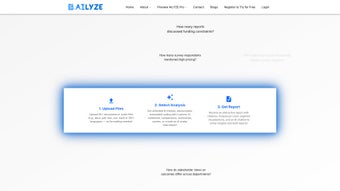
The upload process is drag‑and‑drop: simply drop PDFs, DOCX, or XLSX files into the secure zone, and the AI automatically detects language, extracts text, and begins analysis. For the AI Interviewer, you define a set of questions, choose a target language, and launch the virtual interview; responses are recorded, transcribed, and added to the thematic analysis in real time. Once processing finishes—typically under two minutes for three documents—the dashboard presents themes, quotes, sentiment scores, and visual summaries.
You can then export the results as PDF reports, PowerPoint decks, or CSV files, or invite colleagues to view the live dashboard via email.
AILYZE is a cloud‑native SaaS platform, so it runs on any modern web browser—Chrome, Edge, Firefox, or Safari—on Windows 10/11, macOS Monterey or later, and Linux distributions with up‑to‑date browsers. Because the heavy processing happens on AILYZE’s servers, there are no local CPU or RAM constraints, making it ideal for laptops, desktops, and even thin clients. For Enterprise customers who opt for the offline solution, a dedicated on‑premises virtual machine (VM) is provided. The VM supports Windows Server 2019/2022 and Ubuntu 20.04 LTS, with a minimum of 8 GB RAM and 4 CPU cores. All communication between the client and server is encrypted with TLS 1.3, and data at rest is stored using AES‑256 encryption.
To ensure reliable results, follow these best practices: clean source files by removing watermarks or encrypted sections; standardize file naming conventions (e.g., “Interview_01_EN.docx”) so the platform can group related documents automatically; define clear research questions or custom keywords to guide the AI’s clustering; leverage export options for downstream statistical analysis; and maintain strong security hygiene by using two‑factor authentication and rotating passwords every 90 days. These steps help the AI deliver the most accurate and actionable insights possible.
Pros, Cons, Expert Review & Frequently Asked Questions
Pros
- Lightning‑fast theme extraction and summarization—even with large PDFs.
- Robust multilingual support eliminates the need for external translation services.
- AI Interviewer automates data collection, saving time and budget.
- Secure, GDPR‑compliant cloud architecture with optional offline Enterprise mode.
- User‑friendly dashboard that requires no technical expertise.
- Flexible pricing tiers accommodate both small teams and large enterprises.
- Continuous model improvement through anonymized learning from aggregated data.
- Comprehensive export options (PDF, PPTX, CSV) for seamless integration with other tools.
Cons
- Advanced analysis (frequency tables, sentiment heatmaps) is limited to the Pro plan.
- Offline Enterprise deployment requires IT resources to set up the VM.
- While the AI is highly accurate, extremely domain‑specific jargon may need manual validation.
- Export formats are limited to PDF, PPTX, and CSV; no direct integration with BI tools like Tableau yet.
- Initial learning curve for teams unfamiliar with AI‑driven qualitative analysis.
Overall Rating: 4.5 / 5
AILYZE delivers a compelling blend of speed, accuracy, and multilingual capability that few competitors can match. Its AI Interviewer is a game‑changer for remote research, and the secure cloud infrastructure meets the highest compliance standards. The primary trade‑off is the need for a Pro subscription to unlock deep analytical tools, which may be a consideration for budget‑conscious teams. Nevertheless, for anyone serious about scaling qualitative research without sacrificing rigor, AILYZE is a worthy investment.
Frequently Asked Questions (FAQ)
Can AILYZE handle scanned PDFs?
Scanned PDFs need OCR (Optical Character Recognition) before upload. AILYZE includes a built‑in OCR engine for most languages, but the accuracy improves when you pre‑process the files with a dedicated OCR tool.
Is there a free version or trial?
Yes, AILYZE offers a 14‑day free trial of the Basic plan, allowing you to analyze up to three documents and test the AI Interviewer feature without any credit card required.
How does the AI ensure data privacy?
All data is encrypted in transit (TLS 1.3) and at rest (AES‑256). For Enterprise customers, the offline mode processes data on a dedicated on‑premises VM, guaranteeing that no information leaves your secure network.
Can I export the raw thematic coding for use in other software?
Absolutely. AILYZE lets you download the full coding matrix as a CSV file, which can be imported into statistical packages like SPSS, R, or NVivo for further manipulation.
What languages does the AI Interviewer support?
The AI Interviewer currently supports over 30 languages, including English, Spanish, Mandarin, Arabic, French, German, Japanese, and Portuguese. New languages are added quarterly based on user demand.
Conclusion & Call to Action
In the fast‑moving world of qualitative research, speed, accuracy, and data security are no longer optional—they are essential. AILYZE brings all three together in a single, AI‑powered platform that transforms raw documents into actionable insights in minutes. Whether you are a solo consultant needing quick thematic snapshots or a multinational corporation requiring offline, compliant analysis, AILYZE scales to meet your needs. The combination of multi‑format ingestion, multilingual AI, and the innovative AI Interviewer makes it a standout choice among research tools.
Ready to accelerate your research workflow? Download AILYZE today, start your free trial, and experience how AI can turn hours of manual coding into seconds of insight. For teams seeking enterprise‑grade security, contact the sales team for a personalized offline deployment plan. Unlock faster, smarter, and more secure qualitative analysis—your data deserves it.



.png)



